Microsoft Fabric is easy to start. That is the problem.
Within an hour of enabling a capacity you can create a workspace, spin up a lakehouse, load a CSV and publish a Power BI report on top of it. The demo is compelling, and it is also misleading, because the low friction that makes the first hour pleasant makes the first month dangerous. Decisions made casually while exploring (which engine holds which data, where configuration lives, who can see what) harden into architecture faster than anyone expects.
This is the first post in a series drawn from building an enterprise data platform on Fabric for an investment management firm. It is a medallion warehouse fed by transfer-agency transaction files, portfolio-system exports and an index vendor's SFTP deliveries, and it runs on a metadata-driven engine: about a hundred warehouse jobs and every file feed go through a handful of generic notebooks, and onboarding a new source is a set of inserts into control tables rather than a new notebook. This post is not a product tour. It is the six decisions that mattered most, in the order I now wish I had made them, with the mistakes that taught me.
1. Decide where the control plane lives before you write a pipeline
A metadata-driven platform is only as good as the store that holds its metadata. Ours holds jobs, column mappings, key-column roles, load plans and their phases, per-job dependencies, batch control, data quality rules and, eventually, the security grant matrix. Every generic notebook starts by reading it. So the first real decision was which Fabric engine should host it, and the answer was the one I had not planned on: a Fabric SQL Database, not the Warehouse and not a lakehouse.
The reasoning is about what a control plane needs to do. It takes many small writes per run (start a batch, mark a job complete, record a watermark). It needs enforced primary and foreign keys so a load plan cannot reference a job that does not exist. It also benefits from defaults, predictable transactional behavior and an operational database built for frequent state changes. A Fabric SQL Database provides that model and mirrors its data to OneLake for analysis. Fabric Warehouse has since added BIGINT IDENTITY support, but default constraints remain unsupported and PRIMARY KEY, FOREIGN KEY and UNIQUE constraints are still declared NOT ENFORCED. That makes Warehouse a strong analytical engine, but not our choice for operational control-plane state.
I learned this the direct way, by running control-table DDL in the Warehouse and reading DEFAULT keyword not supported. The broader lesson is worth stating plainly: Fabric gives you three engines that speak T-SQL, and they share syntax without sharing semantics. Decide which engine each kind of object belongs in, and run the DDL where it is meant to run.
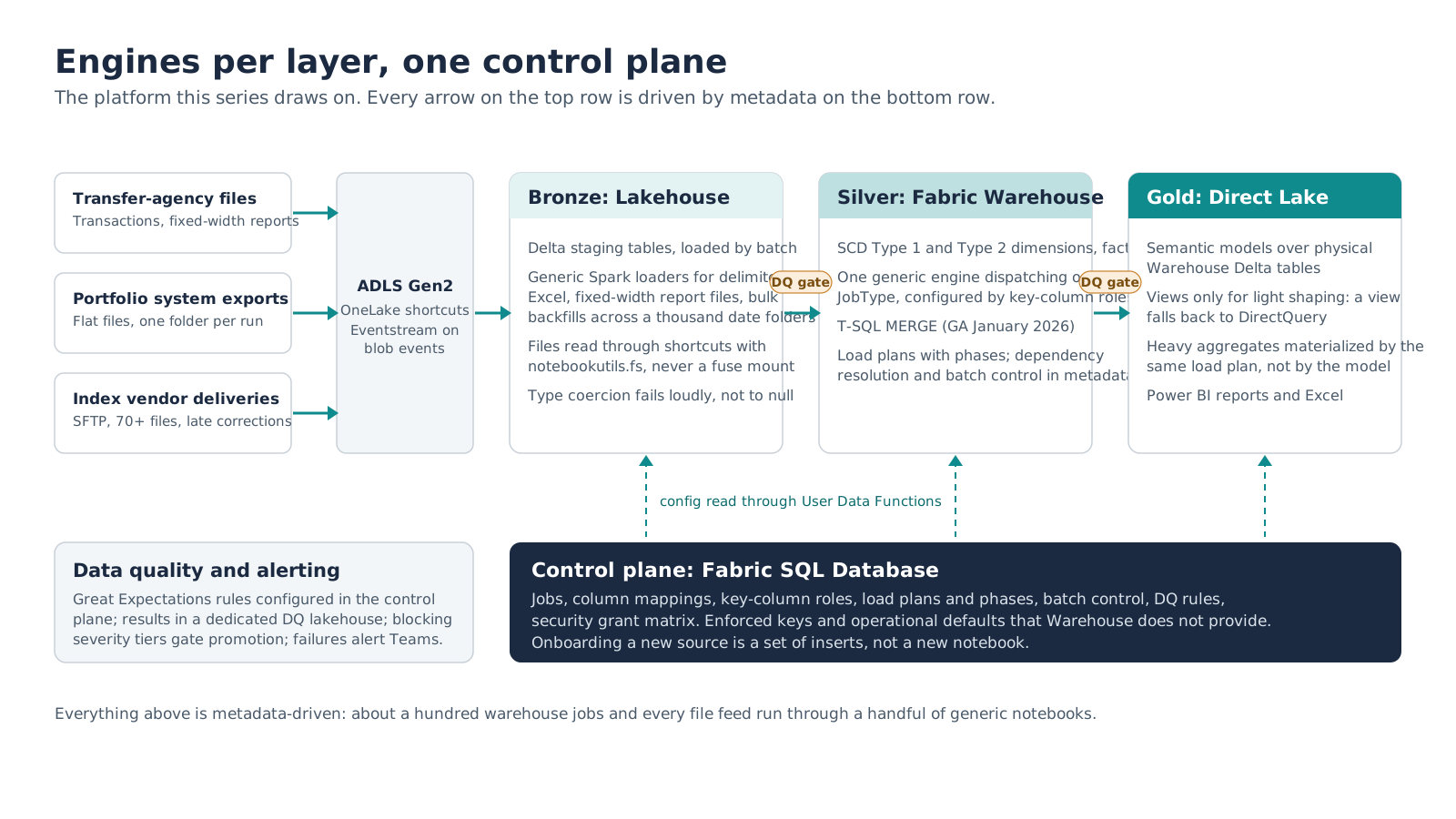
Figure 1. The platform this series draws on. Every arrow in the top row is driven by rows in the bottom one.
2. Pick an engine per layer, not one engine for everything
"Lakehouse or warehouse?" is the question every Fabric team asks first, and the right answer is a question back: for which layer? Both store Delta tables in OneLake and each can read the other. The difference is the engine and the work it is good at, and that varies by layer.
| Layer | Engine | Why | What it ruled out |
|---|---|---|---|
| Bronze / staging | Lakehouse (Spark) | Files as well as tables; flexible schemas; notebooks are the natural home for parsing delimited, Excel and fixed-width report files | Nothing. Raw file handling belongs in Spark. |
| Silver | Fabric Warehouse (T-SQL) | SCD Type 1 and Type 2 dimensions and facts need MERGE, multi-table transactions and a SQL surface the whole team knows. MERGE reaching GA in January 2026 made this the obvious choice. |
Materialized Lake Views are lakehouse-only. Incremental refresh applies when source changes are append-only; updates or deletes cause a full refresh, and Type 2 logic still needs an explicit design. |
| Gold | Direct Lake semantic models over physical Warehouse tables | Fastest path from a curated table to a Power BI visual, with no import refresh | Views as the gold surface. A Direct Lake model over a view falls back to DirectQuery. |
Three details in that table cost real time to discover, so I will spell them out.
First, the Spark connector to the Warehouse reads and writes but cannot MERGE, so Spark cannot upsert into Warehouse tables directly. If Silver is in the Warehouse, the dimension engine is T-SQL, full stop. Second, the Warehouse cannot enable Change Data Feed on its tables, which closes off one incremental pattern you might be planning around. Third, Direct Lake has no hook for Power Query transformations. Anything you want in a Direct Lake model must exist as a physical table, so heavy gold aggregates are materialized by the same load plan that builds Silver, and T-SQL views are kept for light shaping only, knowing they will be served by DirectQuery.
Choose by layer, then hold the line. The moment a team member tries to UPDATE a lakehouse table through its read-only SQL endpoint, or to MERGE into the Warehouse from Spark, the architecture is telling you which engine that work belongs in.
3. Build engines, not notebooks, and learn where the seams are
The platform started with a notebook per feed, which is how every platform starts. It now has one generic file loader that replaced three legacy notebooks (delimited, Excel with multi-block layouts, bulk historical backfills), one generic report parser with two engines (columnar for fixed-width print reports, key-value block for section-based ones), and one generic warehouse engine that dispatches on a job's JobType (Type 1 dimension, Type 2 dimension, fact variants) and configures itself from key-column roles: which columns are the natural key, the surrogate key, the change-detection set, the Type 2 tracked set. A new dimension is an insert into the jobs table and a few rows of role mappings.
Two seams matter when you build this way on Fabric.
Fabric User Data Functions are the right way for notebooks to fetch configuration from the SQL Database; the Spark synapsesql connector does not reach it reliably. But UDFs have limits. Pure-Python helpers that return structured values (lists of dicts, Spark types) do not serialize reliably across the UDF boundary in a notebook, so keep those inline and reserve UDFs for the SQL-connected calls. Type hints must use Optional[X] from typing; the X | None syntax is rejected.
The other seam is testing. A generic engine is a single point of failure for a hundred jobs, so before the rebuilt version touched production it ran a local validation harness on Spark 3.5 and Delta 3.2 covering every job type, watermark case and delete-detection mode. Seventeen cases, all green, then deploy. If your engine is generic, your tests have to be too.
4. Assume every file is lying to you
This is the section I would hand to anyone loading vendor files into a lakehouse. Three incidents, none of which produced a failed pipeline run.
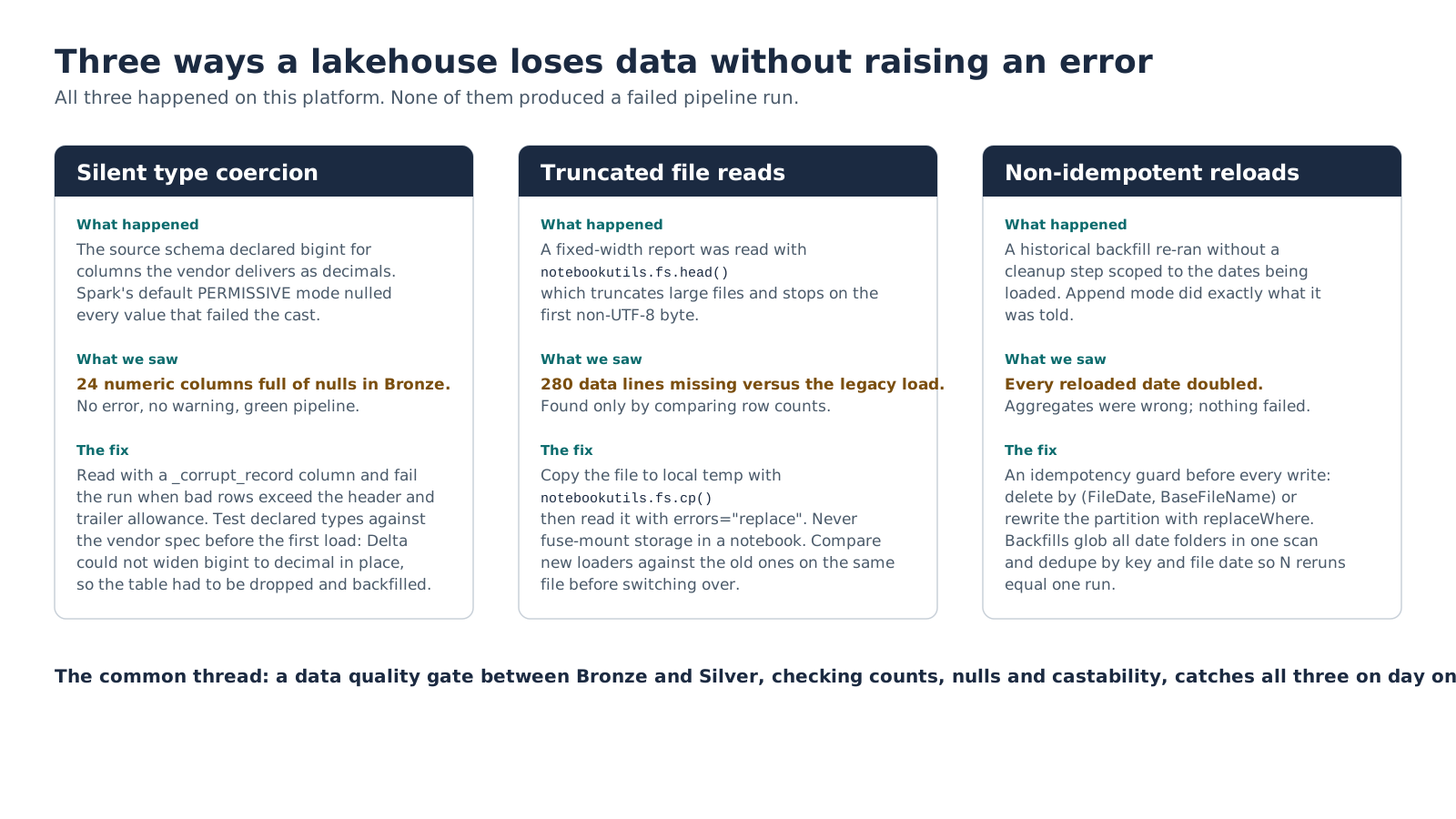
Figure 2. All three were caught by comparing numbers, not by reading logs. A data quality gate between Bronze and Silver catches all of them on day one.
Silent type coercion. A source schema declared bigint for two dozen columns the vendor actually delivers as decimals. Spark's default PERMISSIVE read mode does not fail on a bad cast; it writes null. Twenty-four numeric columns in Bronze were null for weeks with a green pipeline above them. The fix was two-part: read with a _corrupt_record column and fail the run when bad rows exceed the small allowance for header and trailer records, and test every declared type against the vendor's own format specification before the first load. In the Fabric runtime used at the time, the affected Delta columns could not be widened from bigint to decimal in place, so the table was rebuilt and backfilled.
Truncated file reads. A fixed-width report was being read with notebookutils.fs.head(), which truncates large files and stops at the first byte that is not valid UTF-8. The new loader produced 280 fewer data lines than the legacy one for the same file, discovered only by putting the two row counts side by side. Now every file is copied to local temp with notebookutils.fs.cp() and read with errors="replace", storage is never fuse-mounted from a notebook, and no loader replaces its predecessor until both have processed the same files and agreed.
Non-idempotent reloads. A historical backfill across more than a thousand date folders was re-run without a cleanup step scoped to the dates being loaded. Append mode did exactly what it was told and every reloaded date doubled. Every write now sits behind an idempotency guard: a lineage-scoped delete by file date and base file name, or a partition rewrite with replaceWhere. Backfills glob every date folder in one Spark scan and de-duplicate by key and file date so that N reruns produce the same result as one.
Two smaller ones, for completeness: vendor files with an .xls extension that are actually tab-delimited text or HTML, which need a byte sniff before you pick a parser; and a transaction-code specification that defined the same mnemonic twice with contradictory meanings, which no amount of engineering fixes and which needs a data owner.
The systemic answer is a data quality framework that treats rules as metadata. Ours uses Great Expectations with rules configured in the control plane and results written to a dedicated DQ lakehouse. It validates at three points (file arrival, post-load Bronze, curated Silver), decides pass or block from configurable severity tiers, and raises a pipeline failure when a blocking rule fails so downstream promotion stops. Every failure alerts Teams with the specific rule and observed value. Build the gate before you need it.
5. Security: workspace roles bypass everything
Fabric offers a broad menu of data protection: dynamic data masking, row-level security, column-level security and OneLake security. We configured masking on sensitive Warehouse columns, tested it, and initially saw plaintext. The reason is the finding I would put on a poster: workspace Admin, Member and Contributor roles receive elevated Warehouse access and can view unmasked data by design. OneLake security follows the same general pattern for local tables, although shortcut-backed data and user-identity scenarios have documented exceptions. Test the exact access path you plan to use.
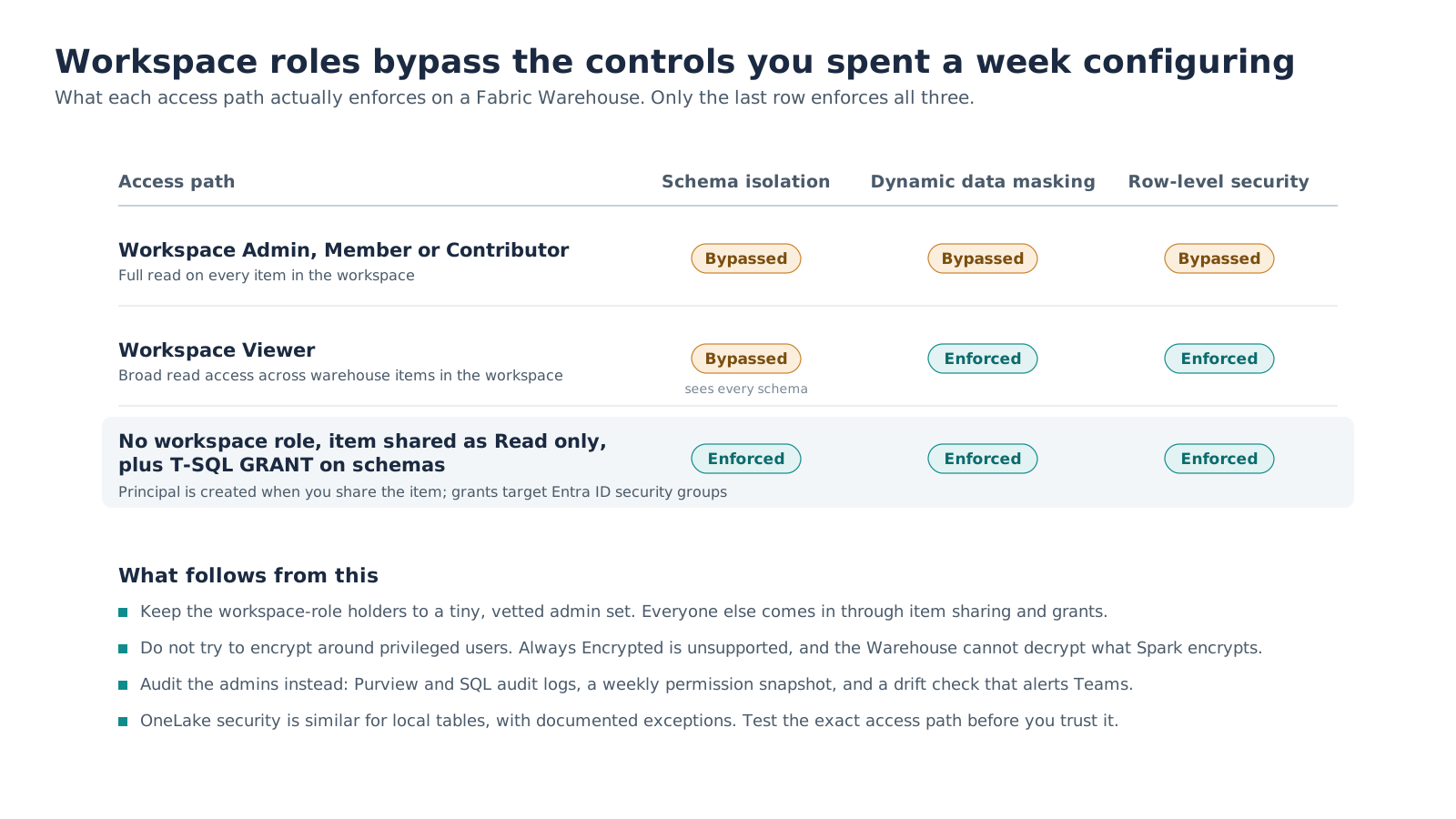
Figure 3. Test every control from a real Viewer account before you trust it.
Workspace Viewer is better but still surprising: masking and row-level security hold, but Viewer grants broad read access to Warehouse items in the workspace, so schema-level isolation is gone. For granular Warehouse access, keep consumers out of workspace roles, share the item with Read permission only, and apply explicit T-SQL GRANTs. Fabric Warehouse does not support an explicit CREATE USER; running GRANT or DENY creates the database user automatically, while item-level Read permission is still required to connect. Grants should normally target Entra ID security groups rather than individuals.
The tempting response to "admins can see everything" is cryptography, and we went a long way down that road: envelope encryption before ingest, keys in Key Vault, ciphertext in the lake. It does not survive contact with the platform. Always Encrypted is unsupported in the Lakehouse and the Warehouse, the Warehouse cannot decrypt what Spark encrypts, and Direct Lake has no transformation hook to decrypt at the report layer. Every path back to plaintext forced the data out of Direct Lake and into a bespoke reveal service.
What we landed on is a governed-admin model: a tiny, vetted admin set of two or three people; everyone else via item sharing and grants; safe derived columns (last four digits, initials) for most reporting; Fabric activity and Warehouse SQL audit logs watching privileged activity; and a governance layer that is itself metadata-driven. A grant-matrix table in the control plane, a stored procedure that deploys it, a drift audit that compares intended grants to actual ones, and a weekly notebook that snapshots permissions and workspace role assignments and alerts the team when they change. Design this before the first sensitive table lands. We did it after, and the retrofit cost more than the original build.
6. Event-driven ingestion: Data Activator is a doorbell, not a buffer
An index vendor delivers seventy-plus files per run over SFTP on an unpredictable schedule, and sends corrections for prior dates with _1, _2 revision suffixes. A scheduled daily load misses late corrections. Reloading a whole date wipes sibling file types that share the partition but were never corrected. So the pipeline moved to events: a blob-created event for each file arriving in the landing zone.
The design mistake waiting here is to treat Data Activator as the durable record of those seventy arrivals. It is a rules engine that evaluates events and triggers actions, not a queue or processing ledger. Activator can now pass selected parameter values to Fabric items in preview, which is useful context for a triggered run, but it does not replace a manifest that survives bursts, retries and corrections. Debounce windows make a rule fire less often; they do not establish exactly-once processing.
The pattern that works is a hybrid. Eventstream fans each arrival out to two places: a durable manifest table, which is the source of truth for what has arrived and what has been processed, and Activator, which simply rings the bell. The notebook drains unprocessed manifest rows, resolves the winning revision per file, and applies lineage-scoped deletes by file date and base file name before loading. The principle generalizes well beyond this vendor: never let the trigger carry the truth.
What I would do differently
Three things, in order of how much rework they would have saved.
Gates and guards on day one. Idempotency guards on every write and a Bronze-to-Silver data quality gate would have caught the silent nulls, the truncated file and the doubled backfill before anyone downstream did. They were all added after the incidents that justified them.
Schemas as tested contracts. Every SourceFileSchema should be validated against the vendor specification and read in a fail-loud mode from the first run. The one thing worse than a failed load is a successful one with the wrong data in it.
Security design before sensitive data. Discovering that workspace roles bypass masking after PII is loaded means re-architecting access with data already in place. Decide the admin set, the sharing model and the grant matrix while the tables are still empty.
What's next
Each of these sections becomes its own post. Next is the one I would read first if I were starting today: why elevated Warehouse roles can see unmasked data, the encryption detour that did not survive contact with the platform, and the access model and metadata-driven governance that did. The control plane deep dive follows after that.
If you are at the whiteboard stage of a Fabric implementation, the most useful thing you can do this week is decide where your metadata lives and which engine owns each layer, before anyone creates a table. It will feel slow. It is the fastest path.
Microsoft documentation referenced
Turn these lessons into a practical implementation plan.
Meridian Software Inc helps growing organizations assess workloads, design governed architectures, migrate data, and build Microsoft Fabric solutions that teams can operate with confidence.